A ZTNA Pattern for Private Developer Tools: Claude Code on Amazon Bedrock
Overview
Zero trust network access (ZTNA) gives a user access to a specific application after an identity and access policy check, without placing the user’s device on the whole private network. AWS Verified Access is AWS’s identity-aware access service for private applications.
This post applies that pattern to a developer tool: Claude Code connects to an organization-managed Claude Apps Gateway, which routes inference requests to Amazon Bedrock. The gateway stays behind an internal Application Load Balancer (ALB), Verified Access checks the developer’s identity, and the gateway uses its ECS task role to call Bedrock. No Bedrock credentials need to live on the developer’s laptop.
The working path in this example uses a Verified Access TCP CIDR endpoint, the AWS Connectivity Client, and a small local TCP relay. A temporary hosts entry makes Claude Code connect to loopback; the relay forwards the encrypted TLS stream through the client tunnel to the private ALB. This avoids giving the developer broad access to the VPC, while still requiring client software and a local relay.
Scope
This is a client-based ZTNA example, not a clientless HTTPS setup. An earlier attempt to use the clientless HTTPS load-balancer endpoint did not produce a working Claude Code connection. This post validates only the TCP CIDR endpoint with the AWS Connectivity Client; the loopback relay adapts that path to Claude Code’s gateway hostname behavior.
Table of contents
- Overview
- Test results and scope
- ZTNA architecture
- How the example applies ZTNA
- Reproduce the ZTNA example
- 1. Prepare the AWS environment
- 2. Choose a hostname and issue a certificate
- 3. Create the temporary Cognito OIDC identity provider
- 4. Deploy Claude Apps Gateway privately
- 5. Create Verified Access identity resources
- 6. Create the Verified Access CIDR TCP endpoint
- 7. Install and connect the Connectivity Client
- 8. Start a loopback TCP relay
- 9. Make Claude Code resolve the gateway as loopback
- 10. Verify TLS and test Claude Code
- 11. Clean up
- Limitations
- References
Test results and scope
Test status
- Original proof of concept passed: Claude Code
/loginand a Bedrock inference succeeded through the private gateway using the Connectivity Client and TCP relay. The prompt returnedPONG; CloudWatch recorded a Bedrock/v1/messagesrequest with status200.- Fresh retest was inconclusive: a separate isolated deployment on 2026-11-04 had a healthy internal ALB target, but its Verified Access CIDR endpoint remained
pendingafter 12 minutes. AWS did not export a Connectivity Client profile, so no CLI request ran through that deployment. The fresh attempt did not reproduce the earlier success or disprove it.- Clean-room run on 2026-11-05 passed: the exact-host certificate, Cognito setup, and gateway deployment succeeded. The Verified Access CIDR endpoint remained
pendingduring a 12-minute poll while the ALB still had its placeholder ingress rule. After the CDK update replaced that rule with the endpoint security-group source, the endpoint becameactiveduring the first post-update poll sequence; the endpoint target list matched the ALB’s private addresses. The AWS-exported Connectivity Client profile (ClientConfig-${GATEWAY_NAME}.json) was installed in the documented config directory during the test, owned byroot:wheelwith mode600, and verified byte-for-byte against the export. It was removed during cleanup; the test machine no longer has the profile. The temporary export copy was removed after installation. The first filename omitted AWS’s requiredClientConfig-prefix, which caused the client’s “missing or invalid” error; renaming it to the required prefix resolved that issue. The user confirmed the client reportedConnectedand supplied Claude Code/statusoutput showing version2.1.318and API providerCloud gateway. The test used gateway binary2.1.299built from upstream commit3ea25056f8c9d5ea8e54ba24ad400e831a965e6f. The visible terminal transcript for/loginshowsLogin successful; the exact promptReply with exactly PONG.returnedPONG. A sanitized CloudWatch query found two upstream Bedrock/v1/messagesHTTP200events; the latest was at2026-11-05T02:43:56.174Z.- Clean-room cleanup completed and verified: the loopback relay was stopped; the hosts file was restored byte-for-byte to its pre-test contents; test managed settings and the test Connectivity Client profile were removed; the Connectivity Client was signed out and its tunnel process exited. The gateway stack, Verified Access resources, VPC, test database, Cognito pool/domain, exact-host certificate, DNS records, ECR repository, and test log group are absent. No test RDS automated backup or manual snapshot remains. AWS retains one
INACTIVEECS cluster record with no services or running tasks; it is nonbillable. The client’s encrypted secure store anddbsettings.jsonremain in place, and unrelated profiles were left untouched.
Repeatability scope: the steps were followed successfully once in a clean-room run. A second independent reproduction by a different operator or environment has not yet been performed.
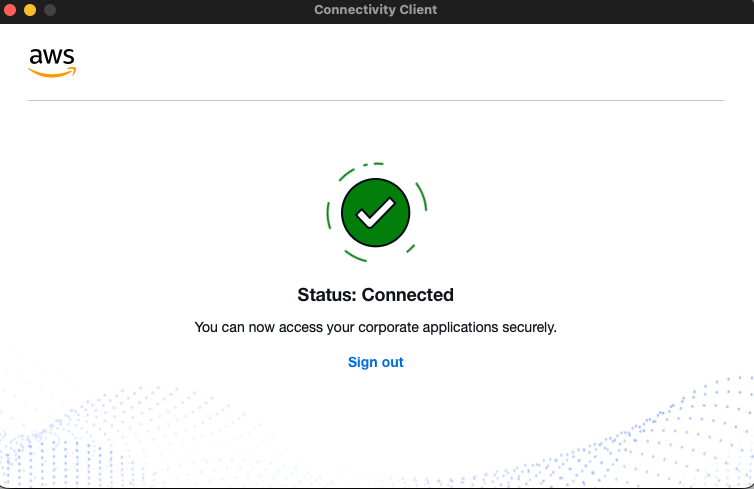
Figure 3. The original Connectivity Client screen shows the Connected state. This verifies tunnel status, not an inference request.
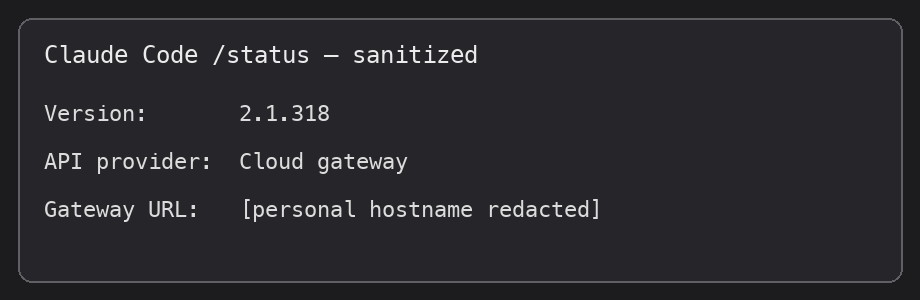
Figure 4. Sanitized rendering of the CLI /status screen showing version 2.1.318 and the Cloud gateway provider. Session identifiers, peer address, personal hostname, and local paths are omitted. This verifies gateway configuration, not an inference request.
ZTNA architecture: identity-gated access to a private developer service
The diagram shows the passing implementation. Verified Access applies the identity policy to access through its TCP endpoint. The endpoint’s security group is the only inbound source allowed by the private ALB, while the gateway uses its AWS task role for Bedrock.
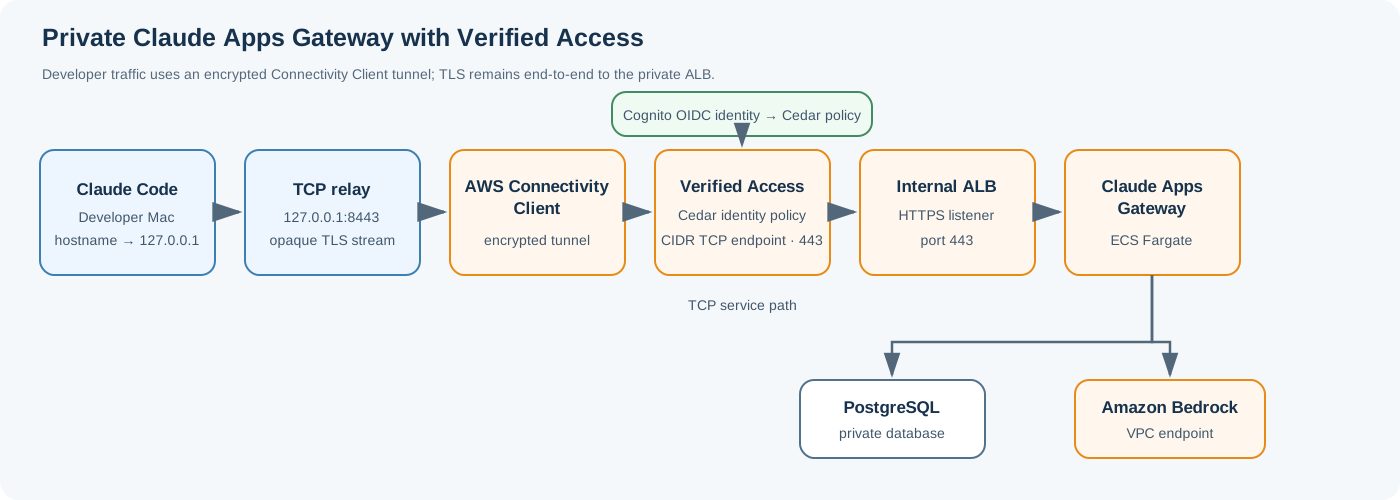
In the successful test, the developer-facing hostname resolved to 127.0.0.1 because of a temporary /etc/hosts entry. A raw TCP relay listened on loopback port 8443 and forwarded the TLS stream to a per-target DNS name returned by a Verified Access CIDR endpoint on port 443. The relay did not terminate TLS, so Claude Code’s hostname and SNI remained intact.
The Gateway ALB stayed private in VPC 10.20.0.0/16. Its security group admitted HTTPS only from the Verified Access endpoint security group. ECS tasks used their task role and a Bedrock VPC endpoint to call Bedrock. The AWS Connectivity Client routed the Verified Access service prefix through its encrypted tunnel; the Mac did not receive a direct route to the VPC’s 10.20.x.x addresses.
How the example applies ZTNA
- Access is identity-gated. A Cognito OIDC trust provider supplies the developer identity, and the Verified Access group policy permits the test user’s email.
- The private service has a narrow network boundary. The internal ALB accepts HTTPS from the Verified Access endpoint security group; it is not opened to the internet or to a broad client CIDR.
- The developer receives application access, not a VPC route. The client carries traffic to the Verified Access service prefix through its encrypted tunnel. This test did not establish direct reachability to VPC subnets or verify per-application routes.
- The workload has its own cloud identity. The ECS task role authorizes Bedrock calls, keeping those AWS permissions off the developer device.
- The local relay is an application compatibility adapter. It preserves the gateway hostname and TLS SNI while making the configured hostname resolve to loopback for Claude Code.
The client still creates an encrypted tunnel and must be installed on the developer’s Mac. The design avoids a traditional full-device VPN and broad VPC access; it is not client-free.
Reproduce the ZTNA example: TCP through the Connectivity Client
1. Prepare the AWS environment
Use a dedicated test account or profile and set the target region:
export AWS_PROFILE=your-test-profile
export AWS_REGION=us-east-1
export RUN_SUFFIX=$(uuidgen | tr -d '-' | cut -c1-8)
export GATEWAY_NAME="claude-gateway-poc-${RUN_SUFFIX}"
aws sts get-caller-identity
printf 'RUN_SUFFIX=%s\nGATEWAY_NAME=%s\n' "$RUN_SUFFIX" "$GATEWAY_NAME"
Replace your-test-profile with the named profile you configured in AWS CLI; do not paste the placeholder literally.
Confirm the returned account is the intended test account before creating resources.
Run the AWS CLI and CDK command blocks from this same terminal session so AWS_PROFILE, AWS_REGION, RUN_SUFFIX, and GATEWAY_NAME stay set. If you open another terminal, export those values again.
The local build path requires AWS CLI v2, Node.js/npm, Docker Desktop with a running Linux container engine and Buildx, GPG, jq, curl, shasum, and uuidgen. Check them before deploying:
aws --version
node --version
npm --version
docker info >/dev/null
docker buildx version
gpg --version
jq --version
shasum -a 256 </dev/null
uuidgen
If docker info fails, start Docker Desktop and wait for its engine to become ready; do not start the CDK build until this command succeeds.
Before deploying, verify Bedrock access for the model used by the pinned gateway catalog:
aws bedrock list-inference-profiles \
  --type-equals SYSTEM_DEFINED \
  --query "inferenceProfileSummaries[?inferenceProfileId=='global.anthropic.claude-haiku-4-5-20251001-v1:0'].{Id:inferenceProfileId,Status:status}" \
  --output table
aws bedrock get-foundation-model-availability \
  --model-id anthropic.claude-haiku-4-5-20251001-v1:0 \
  --query 'agreementAvailability.status' \
  --output text
The inference profile should be ACTIVE, and model availability should be AVAILABLE. Complete any Bedrock model-access agreement in the AWS console before continuing if either check fails.
The clean-room test used Claude Code 2.1.318 on the developer Mac and gateway binary 2.1.299 in the container. The gateway was built from sample commit 3ea25056f8c9d5ea8e54ba24ad400e831a965e6f. These values are distinct: the client version is not the container’s version.
The earlier proof of concept did not record the exact Git commit or gateway image version. Its topology, user-side configuration, successful CLI result, and CloudWatch evidence were recorded, but it was not a byte-for-byte deployment lockfile. The 2026-11-05 clean-room run records the pinned sample commit and gateway version above.
Confirm the account can create the VPC, ALB, ECS/Fargate service, RDS PostgreSQL database, VPC endpoints, Cognito resources, ACM certificate, Route 53 records, and Verified Access resources required by the deployment. The test used AWS_PROFILE=ml-sandbox and AWS_REGION=us-east-1. It created temporary AWS resources and removed them after the smoke test.
Choose one hostname, for example gateway.example.com, and substitute it consistently in the certificate, gateway configuration, Cognito callback, managed Claude Code settings, hosts entry, and TLS verification. The test used a Route 53 hosted zone in the same AWS account as the ml-sandbox profile. The CDK stack writes the gateway record into that zone. A zone in another AWS account requires cross-account DNS deployment steps outside this guide; when using a public hosted zone, pass its hosted-zone ID explicitly.
Keep the gateway ALB and Verified Access endpoint in the same VPC. The sample CDK stack creates a VPC by default; deploy it first, then create the Verified Access endpoint attached to that VPC. If you create the VPC yourself, pass that same VPC ID into the CDK deployment using the sample’s vpcId option, and verify the selected private subnets and required VPC endpoints before proceeding. Do not create a separate probe VPC for the Verified Access endpoint.
The successful test used a VPC with these CIDRs:
| Component | Tested example |
|---|---|
| VPC | 10.20.0.0/16 |
| Private subnet A | 10.20.1.0/24 |
| Private subnet B | 10.20.2.0/24 |
| Verified Access CIDR endpoint | 10.20.0.0/22, TCP 443 |
Treat these as values from that test, not guaranteed defaults. When reproducing, use the actual VPC ID, CIDR, and private subnet IDs created by the CDK stack (or the VPC you explicitly pass with vpcId). The Verified Access endpoint must attach to that same VPC, and its endpoint CIDR must be within that VPC and cover the private ALB subnets. Do not copy 10.20.0.0/22 unless it fits the VPC you deployed.
The official gateway stack needs external egress for some identity-provider traffic and AWS service connectivity. The test used a NAT gateway and VPC endpoints for Bedrock Runtime, ECR, Secrets Manager, CloudWatch Logs, CloudWatch Monitoring, and S3.
2. Choose a hostname and issue a certificate
Choose a test hostname in a Route 53 hosted zone, for example:
gateway.example.com
Request a public ACM certificate in us-east-1, create its DNS validation CNAME, and wait for ISSUED. The internal ALB can use a public certificate without becoming internet-facing.
Keep the complete hostname at or below ACM’s 64-character domain-name limit. ACM rejects a longer name at certificate request time. In a long hosted zone, choose a short record label such as gw-1105 rather than a long descriptive prefix.
Set the values you will reuse in later commands:
export GATEWAY_HOST='gw-1105.example.com'
export DNS_ZONE='example.com'
export HOSTED_ZONE_ID='<route53-hosted-zone-id>'
export CERT_ARN='<issued-acm-certificate-arn>'
Choose a unique short host label for each run, keeping the full domain at or below 64 characters.
For this TCP/relay setup, the public application A/AAAA record is not the relay destination. The local hosts entry makes Claude Code connect to loopback, and the relay connects to the separate Verified Access target DNS name. The CDK record points to the internal ALB; in the test, the public hosted zone returned the ALB’s private addresses, which did not make the ALB internet-reachable. The ALB security group remains the access boundary.
Register the Claude Apps Gateway Cognito client callback as:
https://gateway.example.com:8443/oauth/callback
Register the Verified Access Connectivity Client OIDC callback as:
http://localhost:8000
Use separate OIDC app clients for Verified Access and Claude Apps Gateway. For Cognito, allow the openid, email, and profile scopes. Cognito rejects offline_access.
3. Create the temporary Cognito OIDC identity provider
The test used a temporary Cognito User Pool with one verified email identity. In Amazon Cognito → User pools:
- Create a pool named
${GATEWAY_NAME}-userpool. Enable email sign-in, self-service sign-up, and email verification. - Create a unique hosted UI/domain prefix such as
cgrgw-${RUN_SUFFIX}. - Create one app client named
${GATEWAY_NAME}-vafor the AWS Connectivity Client / Verified Access sign-in. Configure its OAuth authorization-code flow, required scopes, and callbackhttp://localhost:8000. - Create a different app client named
${GATEWAY_NAME}-gatewayfor Claude Apps Gateway, using authorization-code flow and callbackhttps://gateway.example.com:8443/oauth/callback. -
In App integration → App clients, open the Verified Access client’s View login page. Choose Sign up, enter the test email, set a temporary password, and enter the verification code sent to that mailbox. The sign-up URL follows this pattern:
https://<domain-prefix>.auth.<region>.amazoncognito.com/signup?response_type=code&client_id=<verified-access-client-id>&redirect_uri=http%3A%2F%2Flocalhost%3A8000&scope=openid%20email%20profileKeep the password and one-time code in the browser only. Do not put them in terminal history, files, or screenshots. After confirmation, Cognito may redirect to
http://localhost:8000before the Connectivity Client is running. If the browser reports that localhost is unavailable, verify the user isCONFIRMEDin the Cognito pool; complete the client sign-in later after launching Connectivity Client. - Record the issuer URL, client IDs, and secrets in a secure local secret store. Do not put secrets into the blog, CDK source, screenshots, or shell history.
Before creating the Verified Access Cedar policy, verify the user’s exact email and confirmation state:
aws cognito-idp list-users --user-pool-id "$USER_POOL_ID" \
  --query 'Users[].{Email:Attributes[?Name==`email`].Value|[0],Status:UserStatus,EmailVerified:Attributes[?Name==`email_verified`].Value|[0]}' \
  --output table
Use that exact Email value in the Cedar policy and make sure ALLOWED_EMAIL_DOMAINS matches its domain. Stop if they differ; do not broaden the policy to work around a mismatch.
Set the non-secret values used by the later AWS CLI and image-stamping commands:
export USER_POOL_ID='<cognito-user-pool-id>'
export COGNITO_DOMAIN_PREFIX='<cognito-hosted-domain-prefix>'
export VA_OIDC_CLIENT_ID='<verified-access-app-client-id>'
export GATEWAY_OIDC_CLIENT_ID='<gateway-app-client-id>'
export OIDC_ISSUER="https://cognito-idp.us-east-1.amazonaws.com/$USER_POOL_ID"
export ALLOWED_EMAIL_DOMAINS='<domain-of-your-verified-test-email>'
Keep the two app-client secrets in a secure secret store. The gateway client secret is entered through the hidden prompt in the Secrets Manager step; the Verified Access client secret is entered in the trust-provider form.
The Verified Access trust provider and Claude Apps Gateway are distinct OIDC clients even though they use the same temporary User Pool. Their callbacks and sign-in sessions are separate.
4. Deploy Claude Apps Gateway privately
Deploy the official sample with:
- An internal IPv4 ALB listening on HTTPS port
443. - ECS Fargate tasks for Claude Apps Gateway.
- PostgreSQL for gateway state.
- An ECR repository and the sample’s pinned Claude Code binary/image.
- An ECS task role with the sample’s required Bedrock invoke permissions.
- VPC endpoints and NAT egress as required by the sample.
Use the pinned reference revision and the CDK sequence below to deploy in the test account and region. Set the gateway’s public_url to:
https://gateway.example.com:8443
Here, 8443 is the developer’s local relay port. The Verified Access endpoint and internal ALB use port 443.
Provide the gateway’s OIDC issuer and client ID in the gateway config. Store the OIDC client secret in Secrets Manager and inject it into the ECS service; do not bake it into the image or commit it to a file.
In cdk/gateway.yaml.template, under oidc:, add this active setting (the template’s default includes offline_access, which Cognito rejects):
scopes: [openid, email, profile]
Confirm the generated gateway.yaml contains this Cognito-compatible setting before building the image.
The sample deployment guide uses two CDK passes: first create ECR, then stage the pinned Linux Claude Code binary and gateway configuration, build and push the image, and deploy the full ECS/ALB/RDS stack. After the full stack is created, write the real OIDC secret to Secrets Manager and restart the ECS service so the tasks load it. Get the exact sample revision used by this procedure:
git clone https://github.com/aws-samples/anthropic-on-aws.git
cd anthropic-on-aws
git checkout 3ea25056f8c9d5ea8e54ba24ad400e831a965e6f
cd claude-apps-gateway/cdk
See the sample’s canonical deployment guide and CDK guide.
The sample hardcodes the CloudFormation stack name ClaudeGatewayStack. Before deploying, confirm that stack name is unused in the selected account and region; only one deployment of this CDK sample can use it there at a time. GATEWAY_NAME controls the ECR repository, ECS cluster/service, secrets, and log group, so use a unique value for each isolated run.
Apply this CDK compatibility change before pass 2. The reference revision strips the URL scheme but leaves :8443 in the Route 53 record name. In cdk/lib/claude-gateway-stack.ts, change the record hostname parsing to:
const recordHost = new URL(publicUrl).hostname;
This keeps the Route 53 record name to gateway.example.com; retain :8443 in publicUrl and the OAuth callback. Without this change, the pass-2 CDK deployment can fail while creating the DNS record. This is a correction for the pinned reference revision, not a claim about the original test commit.
At the pinned reference revision listed above, the CDK sequence is:
- In
claude-apps-gateway/cdk, install dependencies and bootstrap the account/region:npm installandnpx cdk bootstrap -c imageReady=false. - Deploy pass 1 with
npx cdk deploy -c imageReady=false -c gatewayName="$GATEWAY_NAME"; this creates the ECR repository. Record theEcrRepositoryUrioutput. -
Stamp
gateway.yamlwith the gateway hostname, Cognito issuer/client ID, and the domain of the verified test email:PUBLIC_URL="https://${GATEWAY_HOST}:8443" \ AWS_REGION=us-east-1 \ OIDC_ISSUER="$OIDC_ISSUER" \ OIDC_CLIENT_ID="$GATEWAY_OIDC_CLIENT_ID" \ ALLOWED_EMAIL_DOMAINS="$ALLOWED_EMAIL_DOMAINS" \ ./scripts/stamp-config.sh grep -nE '^[[:space:]]*scopes:' gateway.yaml
The active oidc.scopes line should be scopes: [openid, email, profile]. The pinned template contains comment-only examples mentioning offline_access; those comments are not active configuration.
-
Stage and verify the pinned Linux x64 Claude Code binary, then build and push the image. This Bash snippet follows the pinned sample’s GPG-signed release-manifest procedure. The
VERSIONis the gateway image binary version, not the developer CLI version:# Run in Bash from the sample's cdk/ directory. ( set -euo pipefail GNUPGHOME=$(mktemp -d) TMP_RELEASE_DIR=$(mktemp -d) cleanup_build_temps() { gpgconf --homedir "$GNUPGHOME" --kill all >/dev/null 2>&1 || true find "$TMP_RELEASE_DIR" -depth -mindepth 1 -delete rmdir "$TMP_RELEASE_DIR" find "$GNUPGHOME" -depth -mindepth 1 -delete rmdir "$GNUPGHOME" } trap cleanup_build_temps EXIT export GNUPGHOME VERSION=$(sed -n 's/^CLAUDE_VERSION="${CLAUDE_VERSION:-\(.*\)}"$/\1/p' scripts/setup.sh) RELEASES_URL=https://downloads.claude.ai/claude-code-releases KEYS_URL=https://downloads.claude.ai/keys/claude-code.asc GPG_FINGERPRINT=31DDDE24DDFAB679F42D7BD2BAA929FF1A7ECACE curl -fsSL "$KEYS_URL" | gpg --import gpg --fingerprint security@anthropic.com | tr -d ' ' | grep -qi "$GPG_FINGERPRINT" curl -fsSL -o "$TMP_RELEASE_DIR/manifest.json" \ "$RELEASES_URL/$VERSION/manifest.json" curl -fsSL -o "$TMP_RELEASE_DIR/manifest.json.sig" \ "$RELEASES_URL/$VERSION/manifest.json.sig" gpg --verify "$TMP_RELEASE_DIR/manifest.json.sig" "$TMP_RELEASE_DIR/manifest.json" EXPECTED_SHA=$(jq -r '.platforms["linux-x64"].checksum' "$TMP_RELEASE_DIR/manifest.json") curl -fL -o claude \ "$RELEASES_URL/$VERSION/linux-x64/claude" chmod +x claude printf '%s claude\n' "$EXPECTED_SHA" | shasum -a 256 -c ECR_URI=$(aws cloudformation describe-stacks \ --stack-name ClaudeGatewayStack \ --query "Stacks[0].Outputs[?OutputKey=='EcrRepositoryUri'].OutputValue" \ --output text) aws ecr get-login-password --region us-east-1 | docker login --username AWS --password-stdin "${ECR_URI%%/*}" docker build --platform=linux/amd64 --provenance=false \ -t "${ECR_URI}:${VERSION}" . docker push "${ECR_URI}:${VERSION}" )
The subshell uses a temporary GPG home so the signing key does not remain in the user’s default keyring.
-
Deploy pass 2 with:
npx cdk deploy \
  -c gatewayName="$GATEWAY_NAME" \
  -c publicUrl="https://${GATEWAY_HOST}:8443" \
  -c zoneName="$DNS_ZONE" \
  -c zoneId="$HOSTED_ZONE_ID" \
  -c certArn="$CERT_ARN" \
  -c ingressCidr=192.0.2.1/32 \
  -c imageTag=2.1.299
Use the same
publicUrland identity settings used to stamp the image.192.0.2.1/32is a documentation-only address used to satisfy the sample’s required CIDR parameter without admitting a real client. Replace the ALB security-group rule with the Verified Access endpoint security-group rule immediately after creating the endpoint and before testing connectivity. -
Store the gateway OIDC app-client secret at
${GATEWAY_NAME}-oidc-client-secretin Secrets Manager and force a new ECS deployment. With the example name, the ECS cluster and service are bothclaude-gateway-poc-20261105:Run this block in Bash. It reads the secret without echoing it and streams it to the AWS CLI through standard input; it does not write the secret to a local file or command history. On macOS, enter
bashfirst if your login shell is zsh.( set -euo pipefail set +x read -r -s -p 'OIDC client secret: ' OIDC_CLIENT_SECRET printf '\n' printf '%s' "$OIDC_CLIENT_SECRET" | aws secretsmanager put-secret-value \ --secret-id "${GATEWAY_NAME}-oidc-client-secret" \ --secret-string file:///dev/stdin unset OIDC_CLIENT_SECRET ) aws ecs update-service \ --cluster "$GATEWAY_NAME" \ --service "$GATEWAY_NAME" \ --force-new-deploymentVerify the ECS service reaches steady state before testing:
aws ecs wait services-stable \
  --cluster "$GATEWAY_NAME" \
  --services "$GATEWAY_NAME"
The original PoC’s exact CDK commit and build log were not retained, so these steps describe the pinned reference revision above rather than claiming it is the identical build used for the successful inference. The tested ALB ingress also used the Verified Access endpoint security group; replace the sample’s placeholder ingressCidr rule before treating the network path as restricted.
For this PoC, the developer-facing public_url included :8443; the local relay listened on that port, while the ALB itself terminated TLS on 443. After the Verified Access endpoint exists, tighten the ALB security group so inbound HTTPS is allowed only from the Verified Access endpoint security group. Do not leave the sample’s broader placeholder/client CIDR rule in place. The successful test relied on the endpoint security-group reference as its network boundary.
The successful run emitted warnings that access_control.allow_cidrs was empty and listen.trusted_proxies was unset. The ALB security group still restricted network ingress to the Verified Access endpoint. The test did not record the source addresses needed to choose gateway-level CIDRs or trusted-proxy values. Before production, measure the source addresses observed at the gateway, set the allow-list and trusted proxy configuration from that evidence, and repeat /login and inference tests.
5. Create Verified Access identity resources
In the AWS Console, select US East (N. Virginia) / us-east-1, then open VPC → AWS Verified Access. Create the identity objects in this order:
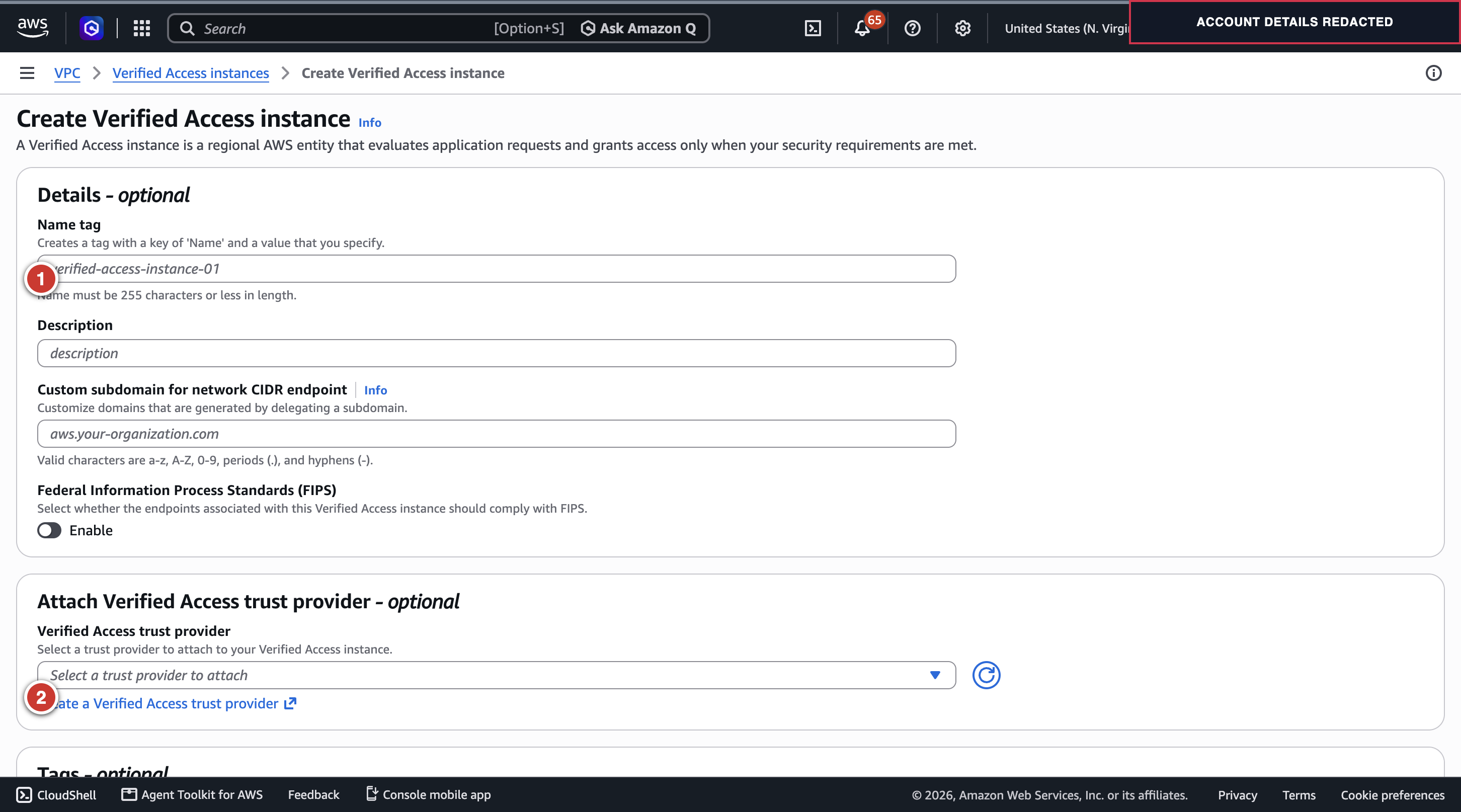
Figure 1. Create Verified Access instance: ① instance name; ② create or attach the OIDC trust provider. The account profile area is masked.
- Choose Verified Access instances → Create Verified Access instance. Add a clear name and description. Attach the OIDC trust provider after creating it.
- Choose Verified Access trust providers → Create Verified Access trust provider. Select User trust provider / OIDC, provide the Cognito issuer and app-client details for the Connectivity Client, and use the required localhost callback. Add the provider to the instance.
- Create a Verified Access group attached to that instance and trust provider. Give it a restrictive Cedar policy for the test user. The test used an email-only policy similar to:
permit(principal, action, resource)
when {
  context.claude_va_loopback_idp.email == "developer@example.com"
};
The policy-reference alias in the expression must match the trust provider’s configured alias. Use a dedicated test user and remove the temporary pool after the test.
Use $GATEWAY_NAME in the instance/group/trust-provider names or descriptions so the PoC resources are easy to identify during cleanup.
After the instance is created, copy its ID from the instance details and set it in the terminal where you run the AWS CLI commands:
export VA_INSTANCE_ID='vai-<verified-access-instance-id>'
export VA_TRUST_PROVIDER_ID='vatp-<verified-access-trust-provider-id>'
export VA_GROUP_ID='vag-<verified-access-group-id>'
For the user trust provider, set the issuer to the Cognito issuer value shown inside the discovery document (for a User Pool, it has the form https://cognito-idp.<region>.amazonaws.com/<user-pool-id>). Do not enter the discovery document URL ending in /.well-known/openid-configuration as the issuer. Verify that the authorization, token, and user-info endpoints match Cognito’s discovery document. Configure only the claims/scopes needed by the policy, including email. Do not capture the app-client secret in a screenshot.
Fetch the discovery values from the pool and use them in both OIDC option sections:
OIDC_DISCOVERY_URL="https://cognito-idp.us-east-1.amazonaws.com/${USER_POOL_ID}/.well-known/openid-configuration"
curl -fsSL "$OIDC_DISCOVERY_URL" |
  jq '{issuer,authorization_endpoint,token_endpoint,userinfo_endpoint,jwks_uri}'
For a TCP endpoint, also complete the trust provider’s Native application OIDC options. These are separate fields from the regular OIDC options; copy the same Cognito issuer, authorization endpoint, token endpoint, user-info endpoint, Verified Access app-client ID, app-client secret, and space-delimited scopes (openid email profile) into the native section. Set Public signing key URL to Cognito’s jwks_uri from the discovery document. For a pool in us-east-1, the URL has this form:
https://cognito-idp.us-east-1.amazonaws.com/<user-pool-id>/.well-known/jwks.json
The AWS API/CLI property is NativeApplicationOidcOptions / --native-application-oidc-options. Keep the native and regular OIDC values aligned with the same Verified Access app client. The client secret is sensitive: enter it in the AWS console field and do not paste it into a terminal command or this blog. Verified Access rejects TCP endpoint creation if the native options are missing.
6. Create the working Verified Access CIDR TCP endpoint
The first TCP load-balancer endpoint stayed pending for more than 12 minutes. The working test used a Verified Access CIDR endpoint instead:
- VPC attachment.
- The two private subnets.
- CIDR
10.20.0.0/22. - Protocol
tcp. - Port range
443–443. - A dedicated endpoint security group.
Read the VPC and ALB details from the deployed CloudFormation stack before creating the endpoint:
VPC_ID=$(aws cloudformation list-stack-resources \
  --stack-name ClaudeGatewayStack \
  --query 'StackResourceSummaries[?ResourceType==`AWS::EC2::VPC`].PhysicalResourceId | [0]' \
  --output text)
VPC_CIDR=$(aws ec2 describe-vpcs --vpc-ids "$VPC_ID" \
  --query 'Vpcs[0].CidrBlock' --output text)
ALB_DNS=$(aws cloudformation describe-stacks \
  --stack-name ClaudeGatewayStack \
  --query "Stacks[0].Outputs[?OutputKey=='AlbDnsName'].OutputValue | [0]" \
  --output text)
printf 'VPC_ID=%s\nVPC_CIDR=%s\nALB_DNS=%s\n' "$VPC_ID" "$VPC_CIDR" "$ALB_DNS"

aws ec2 describe-subnets \
  --filters "Name=vpc-id,Values=$VPC_ID" \
  --query 'Subnets[].{SubnetId:SubnetId,CIDR:CidrBlock,AZ:AvailabilityZone,Tags:Tags}' \
  --output table
dig +short "$ALB_DNS"
aws elbv2 describe-load-balancers \
  --query "LoadBalancers[?DNSName=='$ALB_DNS'].{Name:LoadBalancerName,VpcId:VpcId,SecurityGroups:SecurityGroups}" \
  --output table
In the subnet table, choose the two private subnets in different Availability Zones. Use a CIDR that contains the ALB’s private IPs and fits the VPC; 10.20.0.0/22 was the tested value for the VPC shown above, not a universal default. The load-balancer query gives the ALB security group to edit after endpoint creation.
Copy that security group ID into the same terminal for the cleanup step:
export ALB_SG_ID='<alb-security-group-id-from-the-load-balancer-query>'
In the console, choose Verified Access endpoints → Create Verified Access endpoint, select the CIDR endpoint type, attach it to the same VPC as the internal ALB, select its private subnets, enter a CIDR within that VPC that covers the ALB (10.20.0.0/22 in the test, only if it fits your VPC), choose TCP port 443, and select the dedicated endpoint security group. The group Cedar policy must allow the test identity to perform the endpoint action.
Use $GATEWAY_NAME in the endpoint description or tags to identify it during cleanup.
After creation, copy its endpoint ID and dedicated security-group ID from the endpoint details:
export VA_CIDR_ENDPOINT_ID='vae-<verified-access-endpoint-id>'
export VA_ENDPOINT_SG_ID='sg-<verified-access-endpoint-security-group-id>'
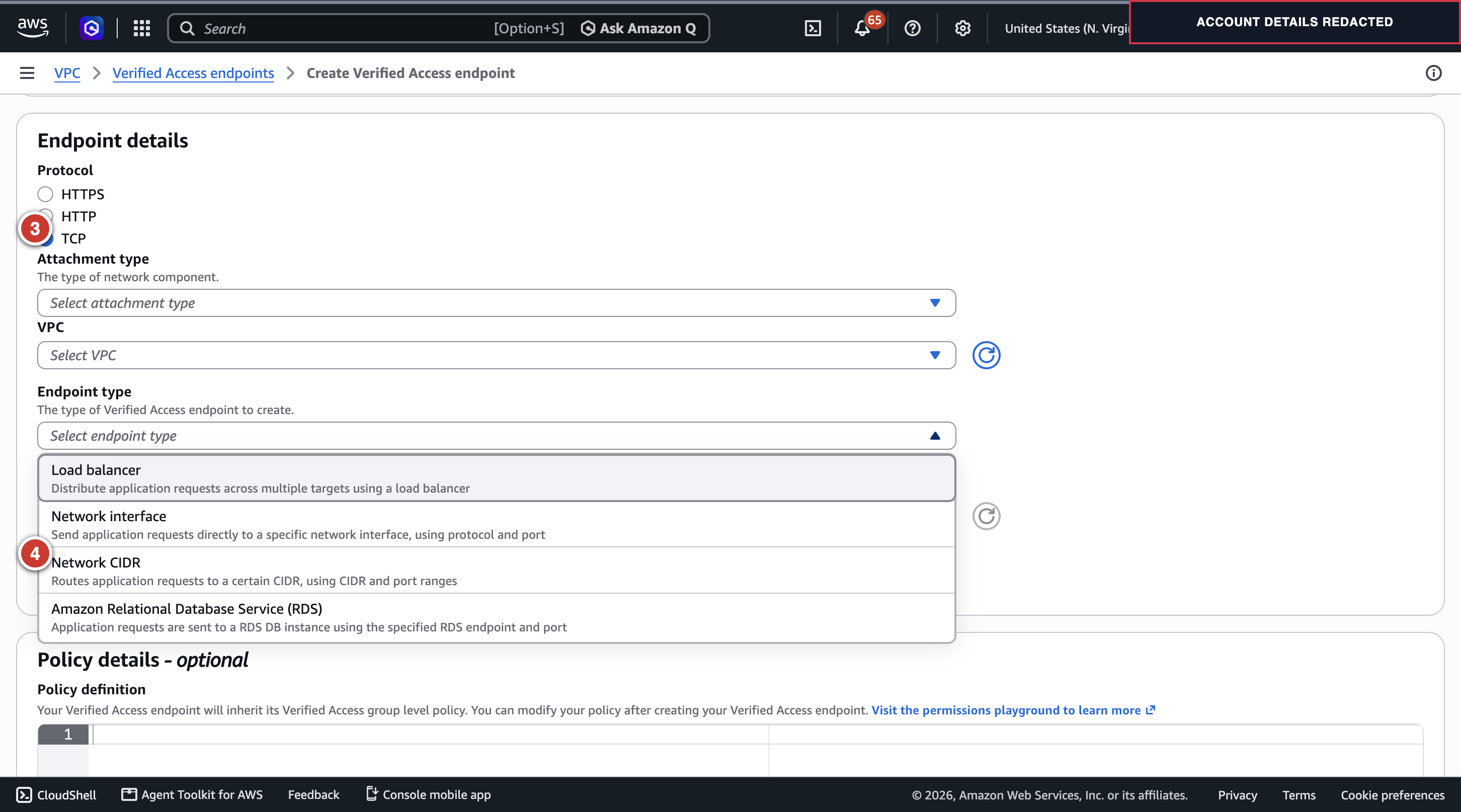
Figure 2. Create the passing endpoint: ③ select TCP; ④ select Network CIDR. The account profile area is masked.
Before polling for endpoint activation or testing connectivity, update the CDK code below so the Verified Access endpoint security group replaces the placeholder as a CloudFormation-managed ALB rule. The first full stack deploy allows only the documentation-only 192.0.2.1/32 source; editing the rule only in the console would create drift and could collide with the CDK update.
-
In
cdk/lib/claude-gateway-stack.ts, add this optional property toGatewayStackProps:readonly verifiedAccessEndpointSecurityGroupId?: string; -
In
cdk/bin/app.ts, pass the context value into the stack:verifiedAccessEndpointSecurityGroupId: ctx('verifiedAccessEndpointSecurityGroupId'), -
In the pass-2 required-input section of
cdk/lib/claude-gateway-stack.ts, replace the originalconst ingressCidr = req(props.ingressCidr, 'ingressCidr');with:const ingressCidr = props.ingressCidr; const verifiedAccessEndpointSecurityGroupId = props.verifiedAccessEndpointSecurityGroupId; if (Boolean(ingressCidr) === Boolean(verifiedAccessEndpointSecurityGroupId)) { throw new Error('Set exactly one of ingressCidr or verifiedAccessEndpointSecurityGroupId'); } -
Replace the original ALB
allowFrom(ec2.Peer.ipv4(ingressCidr), ...)block with:
if (verifiedAccessEndpointSecurityGroupId) {
  const vaEndpointSg = ec2.SecurityGroup.fromSecurityGroupId(
    this,
    'VerifiedAccessEndpointSg',
    verifiedAccessEndpointSecurityGroupId,
  );
  fargate.loadBalancer.connections.allowFrom(
    vaEndpointSg,
    ec2.Port.tcp(443),
    'Verified Access endpoint to gateway ALB',
  );
} else {
  fargate.loadBalancer.connections.allowFrom(
    ec2.Peer.ipv4(ingressCidr!),
    ec2.Port.tcp(443),
    'developers to ALB (HTTPS)',
  );
}
The validation requires exactly one ingress source. Pass ingressCidr=192.0.2.1/32 on the first full deployment so no real client can reach the ALB. After creating the Verified Access endpoint and its security group, deploy the stack again with that security-group ID; the CIDR rule is then removed and replaced by the endpoint security-group reference. Confirm the ALB security group has exactly the Verified Access endpoint security group as its HTTPS source before polling for endpoint activation or testing. This CDK hardening was not part of the historical successful run, so the clean-room CLI test must verify the patched deployment too.
For that final CDK update, use the same context values as pass 2, but replace -c ingressCidr=... with the Verified Access endpoint security-group ID. Use the VA_ENDPOINT_SG_ID value you exported after creating the endpoint; if you opened a new terminal, export that same ID again. Run the command from the sample’s cdk/ directory:
npx cdk deploy \
  -c gatewayName="$GATEWAY_NAME" \
  -c publicUrl="https://${GATEWAY_HOST}:8443" \
  -c zoneName="$DNS_ZONE" \
  -c zoneId="$HOSTED_ZONE_ID" \
  -c certArn="$CERT_ARN" \
  -c verifiedAccessEndpointSecurityGroupId="$VA_ENDPOINT_SG_ID" \
  -c imageTag=2.1.299
Run this after updating the stack code. Keep the hostname, hosted-zone ID, certificate ARN, and image tag identical to pass 2. This update makes the Verified Access security-group rule part of CloudFormation so later deployments do not restore the placeholder CIDR rule. Wait for CloudFormation to report UPDATE_COMPLETE, then verify that the ALB HTTPS ingress source is exactly the endpoint security group.
The clean-room run on 2026-11-05 showed why this update must precede the endpoint status poll: the CIDR endpoint stayed pending during a 12-minute poll before the ALB rule update. After the CDK update completed, an immediate check still showed pending, but the endpoint became active by the fourth 15-second poll. Its returned target IPs matched the ALB’s private addresses. Poll only after the ALB rule update:
for ((attempt=1; attempt<=48; attempt++)); do
  VA_STATUS=$(aws ec2 describe-verified-access-endpoints \
    --verified-access-endpoint-ids "$VA_CIDR_ENDPOINT_ID" \
    --query 'VerifiedAccessEndpoints[0].Status.Code' \
    --output text) || {
      echo "Endpoint status query failed; stop and inspect the endpoint." >&2
      exit 1
    }
  printf 'Verified Access endpoint status: %s (%s/48)\n' "$VA_STATUS" "$attempt"
  if [ "$VA_STATUS" = active ]; then break; fi
  if [ "$VA_STATUS" != pending ]; then
    echo "Endpoint entered a non-pending state; inspect it before continuing." >&2
    exit 1
  fi
  sleep 15
done
if [ "$VA_STATUS" != active ]; then
  echo "Endpoint did not become active within 12 minutes; stop here and inspect its status." >&2
  exit 1
fi
Retrieve the per-target IP and DNS names:
aws ec2 get-verified-access-endpoint-targets \
  --verified-access-endpoint-id "$VA_CIDR_ENDPOINT_ID" \
  --query 'VerifiedAccessEndpointTargets[].{IP:VerifiedAccessEndpointTargetIpAddress,DNS:VerifiedAccessEndpointTargetDns}' \
  --output table
Choose a row whose IP matches one of the ALB private addresses returned by dig +short "$ALB_DNS", then set that row’s DNS name for the relay:
export VA_TARGET_HOST='<target-dns-name-from-Verified-Access>'
Use this target DNS name as the relay upstream. It represents a private target address through the Verified Access endpoint; connecting directly to the 10.20.x.x address from the Mac did not route through the client.
Do not test connectivity until the endpoint is active, the target IP matches an ALB private address, and the CloudFormation-managed ALB HTTPS rule references only the endpoint security group.
7. Install and connect the Connectivity Client
The Connectivity Client requires IPv6 to be enabled on the Mac and an IPv6-capable path to the Verified Access service. Disconnect other VPN clients before testing so they do not override the client routes.
The successful run used Connectivity Client 1.1.1 on macOS (build 20261022.185454). Check the installed version before downloading or installing anything:
CLIENT_APP="/Applications/Connectivity Client/Connectivity Client.app"
if [ -d "$CLIENT_APP" ]; then
  CLIENT_VERSION=$(defaults read "$CLIENT_APP/Contents/Info" CFBundleShortVersionString)
  CLIENT_BUILD=$(defaults read "$CLIENT_APP/Contents/Info" CFBundleVersion)
  printf 'Connectivity Client version: %s (build %s)\n' "$CLIENT_VERSION" "$CLIENT_BUILD"
else
  CLIENT_VERSION=not-installed
  echo "Connectivity Client is not installed"
fi
If version 1.1.1 is already installed, reuse it and skip installation. If another version is installed, follow AWS’s documented uninstall process before installing a different version. Only when the app is absent, download the signed AWS Connectivity Client package through AWS’s Connectivity Client documentation, check it, and install it:
pkgutil --check-signature AWSConnectivityClient.pkg
spctl --assess --type install --verbose=2 AWSConnectivityClient.pkg
sudo installer -pkg AWSConnectivityClient.pkg -target /
Export the Verified Access instance configuration to a unique temporary file. It includes the Verified Access OIDC client secret. The source file is protected by umask 077 and removed automatically after installation. AWS requires the installed JSON filename to start with ClientConfig-; the app will ignore filenames without that prefix.
CLIENT_CONFIG_DIR="/Library/Application Support/Connectivity Client"
CLIENT_PROFILE_PATH="$CLIENT_CONFIG_DIR/ClientConfig-${GATEWAY_NAME}.json"
CLIENT_PROFILE_MARKER="$HOME/.${GATEWAY_NAME}-client-profile-installed"
export CLIENT_PROFILE_PATH CLIENT_PROFILE_MARKER
if ! sudo test -d "$CLIENT_CONFIG_DIR"; then
  sudo install -d -o root -g wheel -m 755 "$CLIENT_CONFIG_DIR"
fi
(
  set -euo pipefail
  umask 077
  CLIENT_CONFIG_PATH=$(mktemp "$HOME/${GATEWAY_NAME}-ClientConfig.XXXXXX")
  trap 'rm -f "$CLIENT_CONFIG_PATH"' EXIT
  if sudo test -e "$CLIENT_PROFILE_PATH" || [ -e "$CLIENT_PROFILE_MARKER" ]; then
    echo "A profile or run marker with this test name already exists; stop and choose a new GATEWAY_NAME." >&2
    exit 1
  fi
  aws ec2 export-verified-access-instance-client-configuration \
    --verified-access-instance-id "$VA_INSTANCE_ID" \
    --output json \
    > "$CLIENT_CONFIG_PATH"
  test -s "$CLIENT_CONFIG_PATH"
  if ! sudo install -o root -g wheel -m 600 \
    "$CLIENT_CONFIG_PATH" \
    "$CLIENT_PROFILE_PATH"; then
    sudo rm -f "$CLIENT_PROFILE_PATH"
    exit 1
  fi
  if ! touch "$CLIENT_PROFILE_MARKER"; then
    sudo rm -f "$CLIENT_PROFILE_PATH"
    exit 1
  fi
)
Open the app installed by the AWS package, select the new test configuration if prompted, and authenticate with the temporary Cognito test user:
open "/Applications/Connectivity Client/Connectivity Client.app"
Keep passwords and verification codes in the browser/system dialog; do not put them in terminal history, screenshots, or this blog.
After sign-in, confirm the client reports Connected. The exported file is sensitive client configuration. Never attach it to a ticket or commit it.
The Connectivity Client stores its access and refresh tokens in its encrypted local secure store. Sign out at cleanup to disconnect the tunnel; leave the existing secure-store database and unrelated profiles in place.
8. Start a loopback TCP relay
The relay listens only on 127.0.0.1:8443, opens a TCP connection to the Verified Access target DNS name on port 443, and pipes bytes in both directions. It must not terminate TLS.
Create relay.mjs:
cat > relay.mjs <<'EOF'
import net from "node:net";

const targetHost = process.env.VA_TARGET_HOST;
const listenHost = "127.0.0.1";
const listenPort = 8443;

if (!targetHost) throw new Error("Set VA_TARGET_HOST to a Verified Access target DNS name");

net.createServer((client) => {
  const upstream = net.connect(443, targetHost);
  client.pipe(upstream);
  upstream.pipe(client);
  client.on("error", () => upstream.destroy());
  upstream.on("error", () => client.destroy());
}).listen(listenPort, listenHost, () => {
  console.log(`TCP relay listening on ${listenHost}:${listenPort}`);
});
EOF
Run it with the active per-target DNS name:
node relay.mjs
9. Make Claude Code resolve the gateway as loopback
Add the temporary /etc/hosts entry:
127.0.0.1 gateway.example.com
On macOS, check first and append it only if it is not already present:
HOSTS_MARKER="$HOME/.${GATEWAY_NAME}-hosts-entry-added"
if [ -e "$HOSTS_MARKER" ]; then
  echo "A stale hosts marker exists; stop and resolve it before this run." >&2
elif ! grep -qE '^127\.0\.0\.1[[:space:]]+gateway\.example\.com([[:space:]]|$)' /etc/hosts; then
  printf '127.0.0.1 gateway.example.com\n' | sudo tee -a /etc/hosts >/dev/null \
    && touch "$HOSTS_MARKER"
else
  echo 'The mapping already exists; this run will not remove it during cleanup.'
fi
Flush and verify the resolver:
sudo dscacheutil -flushcache
dscacheutil -q host -a name gateway.example.com
Install a temporary managed setting at:
/Library/Application Support/ClaudeCode/managed-settings.json
This procedure expects a dedicated test macOS account with no existing managed settings file. Check both the file and the run marker; if either exists, stop and use a clean test account rather than overwriting an organization-managed policy:
SETTINGS_PATH="/Library/Application Support/ClaudeCode/managed-settings.json"
SETTINGS_MARKER="$HOME/.${GATEWAY_NAME}-managed-settings.sha256"
if [ -e "$SETTINGS_MARKER" ] || [ -e "$SETTINGS_PATH" ]; then
  echo 'Existing managed settings found; stop and use a clean test macOS account.' >&2
else
  echo 'No existing managed-settings file; safe to create the PoC file.'
fi
Create the directory and settings file from Terminal:
sudo install -d -o root -g wheel -m 755 \
  "/Library/Application Support/ClaudeCode"
SETTINGS_PATH="/Library/Application Support/ClaudeCode/managed-settings.json"
SETTINGS_MARKER="$HOME/.${GATEWAY_NAME}-managed-settings.sha256"
if sudo test -e "$SETTINGS_PATH" || [ -e "$SETTINGS_MARKER" ]; then
  echo 'Existing managed settings found; stop without changing it.' >&2
else
  sudo tee "$SETTINGS_PATH" >/dev/null <<'JSON'
{
  "forceLoginMethod": "gateway",
  "forceLoginGatewayUrl": "https://gateway.example.com:8443",
  "parentSettingsBehavior": "merge"
}
JSON
  sudo chown root:wheel "$SETTINGS_PATH"
  sudo chmod 644 "$SETTINGS_PATH"
  sudo shasum -a 256 "$SETTINGS_PATH" | awk '{print $1}' > "$SETTINGS_MARKER"
  chmod 600 "$SETTINGS_MARKER"
fi
This file is system-wide and requires macOS administrator approval. Remove it and the hosts entry after the test.
The loopback mapping and TCP relay are the tested compatibility technique; this report does not establish that Anthropic officially supports this local-forwarder pattern. Validate the approach against your organization’s security policy and the current Claude Code gateway documentation before rolling it out beyond a PoC.
10. Verify TLS and test Claude Code
Inspect which certificate the gateway hostname’s SNI selects and record its fingerprint:
openssl s_client \
  -connect 127.0.0.1:8443 \
  -servername gateway.example.com </dev/null 2>/dev/null |
  openssl x509 -noout -subject -fingerprint -sha256
Then:
claude --version
claude /login
If the browser does not open automatically, navigate to https://<GATEWAY_HOST>:8443/device, complete Cognito sign-in, then enter the current code shown in the CLI into that browser page. Do not use http://localhost:8000 for Claude Code login and do not reuse an old code.
This command displays the selected certificate; it does not independently verify the full trust chain. Confirm the certificate name matches the gateway hostname and compare its fingerprint with the expected certificate before accepting Claude Code’s first-trust prompt. The successful /login is the end-to-end TLS and gateway authentication check for this PoC.
Complete the Cognito sign-in in the browser. If Claude Code asks to trust managed settings or a telemetry destination, verify that the destination is the test gateway.
On macOS, Claude Code stores its gateway credentials in Keychain when Keychain is available and unlocked. If login reports a Keychain write failure or falls back to ~/.claude/.credentials.json, stop and resolve the Keychain issue before continuing; do not leave gateway tokens in that file.
After login, Claude Code should report that it is signed in to the cloud gateway. At the Claude Code prompt, send:
Reply with exactly PONG.
The tested result was exactly PONG. Inspect the recent gateway log group:
aws logs tail "/${GATEWAY_NAME}/gateway" --since 10m --format detailed
At the timestamp of the prompt, confirm the gateway emitted a /v1/messages request to upstream bedrock with status 200. The historical successful run also recorded a 740 ms response and model claude-haiku-4-5-20251001. Log fields can vary by gateway version; save the actual sanitized event as evidence. The CLI reply alone does not prove which upstream served the request.
Clean-room inference evidence (2026-11-05): the user-provided terminal transcript shows /login successful and the exact prompt Reply with exactly PONG. returning PONG. A sanitized CloudWatch query found two /v1/messages events routed upstream to Bedrock with HTTP status 200; the latest was at 2026-11-05T02:43:56.174Z. The Connectivity Client and CLI status figures above are connection/configuration evidence; the terminal reply and CloudWatch events are separate inference evidence.
11. Clean up
- Exit Claude Code, sign out of the Connectivity Client to disconnect the tunnel, and stop the relay.
-
Remove the PoC managed settings, remove the hosts mapping only if this test appended it, and flush DNS:
SETTINGS_PATH="/Library/Application Support/ClaudeCode/managed-settings.json" SETTINGS_MARKER="$HOME/.${GATEWAY_NAME}-managed-settings.sha256" if [ -e "$SETTINGS_MARKER" ]; then EXPECTED_SETTINGS_SHA=$(cat "$SETTINGS_MARKER") ACTUAL_SETTINGS_SHA=$(sudo shasum -a 256 "$SETTINGS_PATH" | awk '{print $1}') if [ "$EXPECTED_SETTINGS_SHA" = "$ACTUAL_SETTINGS_SHA" ]; then if sudo rm -f "$SETTINGS_PATH"; then rm -f "$SETTINGS_MARKER" else echo "Could not remove the PoC managed settings; keep its marker and retry cleanup." >&2 fi else echo "Managed settings changed during the test; leave it in place and review manually." >&2 fi else echo "No managed-settings marker from this test; leaving the file untouched." fi HOSTS_MARKER="$HOME/.${GATEWAY_NAME}-hosts-entry-added" if [ -e "$HOSTS_MARKER" ]; then sudo sed -i '' '/^127\.0\.0\.1 gateway\.example\.com$/d' /etc/hosts rm -f "$HOSTS_MARKER" fi sudo dscacheutil -flushcache -
Remove only the test Connectivity Client profile created by this run; its temporary source JSON was already removed after installation. Leave the app, encrypted secure store, and unrelated profiles in place:
CLIENT_PROFILE_MARKER="$HOME/.${GATEWAY_NAME}-client-profile-installed" if [ -e "$CLIENT_PROFILE_MARKER" ]; then if sudo rm -f "$CLIENT_PROFILE_PATH"; then rm -f "$CLIENT_PROFILE_MARKER" else echo "Could not remove the PoC profile; keep its marker and retry cleanup." >&2 fi else echo "No profile marker from this run; leave any existing profile untouched." fi -
Delete the Verified Access endpoint and identity resources. The endpoint must be deleted before its group:
( set -euo pipefail aws ec2 delete-verified-access-endpoint \ --verified-access-endpoint-id "$VA_CIDR_ENDPOINT_ID" for ((attempt=1; attempt<=48; attempt++)); do VA_ENDPOINT_RC=0 VA_ENDPOINT_OUTPUT=$(aws ec2 describe-verified-access-endpoints \ --verified-access-endpoint-ids "$VA_CIDR_ENDPOINT_ID" \ --query 'length(VerifiedAccessEndpoints)' \ --output text 2>&1) || VA_ENDPOINT_RC=$? if [ "$VA_ENDPOINT_RC" -eq 0 ]; then VA_ENDPOINT_COUNT="$VA_ENDPOINT_OUTPUT" elif printf '%s' "$VA_ENDPOINT_OUTPUT" | grep -q 'InvalidVerifiedAccessEndpointId.NotFound'; then VA_ENDPOINT_COUNT=0 else printf '%s\n' "$VA_ENDPOINT_OUTPUT" >&2 exit 1 fi if [ "$VA_ENDPOINT_COUNT" = 0 ] || [ "$VA_ENDPOINT_COUNT" = None ]; then break; fi sleep 15 done if [ "$VA_ENDPOINT_COUNT" != 0 ] && [ "$VA_ENDPOINT_COUNT" != None ]; then echo "Verified Access endpoint is still present; stop cleanup and inspect it." >&2 exit 1 fi for ((attempt=1; attempt<=48; attempt++)); do VA_ENDPOINT_ENI_COUNT=$(aws ec2 describe-network-interfaces \ --filters "Name=group-id,Values=$VA_ENDPOINT_SG_ID" \ --query 'length(NetworkInterfaces)' \ --output text) if [ "$VA_ENDPOINT_ENI_COUNT" = 0 ] || [ "$VA_ENDPOINT_ENI_COUNT" = None ]; then break; fi sleep 15 done if [ "$VA_ENDPOINT_ENI_COUNT" != 0 ] && [ "$VA_ENDPOINT_ENI_COUNT" != None ]; then echo "Verified Access endpoint ENIs remain; stop cleanup and inspect them." >&2 exit 1 fi aws ec2 delete-verified-access-group \ --verified-access-group-id "$VA_GROUP_ID" for ((attempt=1; attempt<=48; attempt++)); do GROUP_RC=0 GROUP_OUTPUT=$(aws ec2 describe-verified-access-groups \ --verified-access-group-ids "$VA_GROUP_ID" \ --query 'length(VerifiedAccessGroups)' \ --output text 2>&1) || GROUP_RC=$? if [ "$GROUP_RC" -eq 0 ]; then GROUP_COUNT="$GROUP_OUTPUT" elif printf '%s' "$GROUP_OUTPUT" | grep -q 'InvalidVerifiedAccessGroupId.NotFound'; then GROUP_COUNT=0 else printf '%s\n' "$GROUP_OUTPUT" >&2 exit 1 fi if [ "$GROUP_COUNT" = 0 ] || [ "$GROUP_COUNT" = None ]; then break; fi sleep 15 done if [ "$GROUP_COUNT" != 0 ] && [ "$GROUP_COUNT" != None ]; then echo "Verified Access group still exists; stop cleanup and inspect it." >&2 exit 1 fi aws ec2 detach-verified-access-trust-provider \ --verified-access-instance-id "$VA_INSTANCE_ID" \ --verified-access-trust-provider-id "$VA_TRUST_PROVIDER_ID" for ((attempt=1; attempt<=48; attempt++)); do ATTACHED_PROVIDER_COUNT=$(aws ec2 describe-verified-access-instances \ --verified-access-instance-ids "$VA_INSTANCE_ID" \ --query "length(VerifiedAccessInstances[0].VerifiedAccessTrustProviders[?VerifiedAccessTrustProviderId=='$VA_TRUST_PROVIDER_ID'])" \ --output text) if [ "$ATTACHED_PROVIDER_COUNT" = 0 ] || [ "$ATTACHED_PROVIDER_COUNT" = None ]; then break; fi sleep 15 done if [ "$ATTACHED_PROVIDER_COUNT" != 0 ] && [ "$ATTACHED_PROVIDER_COUNT" != None ]; then echo "Trust provider remains attached; stop cleanup and inspect the instance." >&2 exit 1 fi aws ec2 delete-verified-access-instance \ --verified-access-instance-id "$VA_INSTANCE_ID" for ((attempt=1; attempt<=48; attempt++)); do INSTANCE_RC=0 INSTANCE_OUTPUT=$(aws ec2 describe-verified-access-instances \ --verified-access-instance-ids "$VA_INSTANCE_ID" \ --query 'length(VerifiedAccessInstances)' \ --output text 2>&1) || INSTANCE_RC=$? if [ "$INSTANCE_RC" -eq 0 ]; then INSTANCE_COUNT="$INSTANCE_OUTPUT" elif printf '%s' "$INSTANCE_OUTPUT" | grep -q 'InvalidVerifiedAccessInstanceId.NotFound'; then INSTANCE_COUNT=0 else printf '%s\n' "$INSTANCE_OUTPUT" >&2 exit 1 fi if [ "$INSTANCE_COUNT" = 0 ] || [ "$INSTANCE_COUNT" = None ]; then break; fi sleep 15 done if [ "$INSTANCE_COUNT" != 0 ] && [ "$INSTANCE_COUNT" != None ]; then echo "Verified Access instance still exists; stop cleanup and inspect it." >&2 exit 1 fi aws ec2 delete-verified-access-trust-provider \ --verified-access-trust-provider-id "$VA_TRUST_PROVIDER_ID" ) -
After deleting the Verified Access endpoint, switch the CDK-managed ALB ingress back to the placeholder CIDR. This removes the stack’s reference to the endpoint security group before that group is deleted:
npx cdk deploy \ -c region=us-east-1 \ -c imageReady=true \ -c gatewayName="$GATEWAY_NAME" \ -c publicUrl="https://${GATEWAY_HOST}:8443" \ -c zoneName="$DNS_ZONE" \ -c zoneId="$HOSTED_ZONE_ID" \ -c certArn="$CERT_ARN" \ -c ingressCidr=192.0.2.1/32 \ -c imageTag=2.1.299 -
Delete the now-unreferenced endpoint security group:
aws ec2 delete-security-group --group-id "$VA_ENDPOINT_SG_ID" -
Save the RDS identifiers for the post-destroy backup check, then destroy the CDK stack with the same placeholder-CIDR context:
DB_INSTANCE_ID=$(aws cloudformation list-stack-resources \
  --stack-name ClaudeGatewayStack \
  --query 'StackResourceSummaries[?ResourceType==`AWS::RDS::DBInstance`].PhysicalResourceId | [0]' \
  --output text)
DBI_RESOURCE_ID=$(aws rds describe-db-instances \
  --db-instance-identifier "$DB_INSTANCE_ID" \
  --query 'DBInstances[0].DbiResourceId' \
  --output text)
NAT_EIP_ALLOC_ID=$(aws ec2 describe-nat-gateways \
  --filter "Name=vpc-id,Values=$VPC_ID" "Name=state,Values=available" \
  --query 'NatGateways[0].NatGatewayAddresses[0].AllocationId' \
  --output text)

npx cdk destroy ClaudeGatewayStack --force \
  -c region=us-east-1 \
  -c imageReady=true \
  -c gatewayName="$GATEWAY_NAME" \
  -c publicUrl="https://${GATEWAY_HOST}:8443" \
  -c zoneName="$DNS_ZONE" \
  -c zoneId="$HOSTED_ZONE_ID" \
  -c certArn="$CERT_ARN" \
  -c imageTag=2.1.299 \
  -c ingressCidr=192.0.2.1/32
This removes the ECR repository/image, ECS service/cluster, ALB, RDS instance, gateway secrets, log group, IAM roles, VPC endpoints, NAT gateway, and CDK-created VPC resources. It does not remove the pre-existing
CDKToolkitstack. -
Check for RDS automated backups and manual snapshots. The sample configures one day of automated backup retention; delete test-only leftovers:
for BACKUP_ARN in $(aws rds describe-db-instance-automated-backups \
  --dbi-resource-id "$DBI_RESOURCE_ID" \
  --query 'DBInstanceAutomatedBackups[].DBInstanceAutomatedBackupsArn' \
  --output text); do
  aws rds delete-db-instance-automated-backup \
    --db-instance-automated-backups-arn "$BACKUP_ARN"
done

aws rds describe-db-snapshots \
  --db-instance-identifier "$DB_INSTANCE_ID" \
  --snapshot-type manual \
  --query 'DBSnapshots[].DBSnapshotIdentifier' \
  --output table
If the snapshot query lists a snapshot created by this PoC, delete that identifier with
aws rds delete-db-snapshot --db-snapshot-identifier <snapshot-id>. -
Delete the Cognito domain and pool, then the ACM certificate:
aws cognito-idp delete-user-pool-domain \
  --domain "$COGNITO_DOMAIN_PREFIX" \
  --user-pool-id "$USER_POOL_ID"
aws cognito-idp delete-user-pool --user-pool-id "$USER_POOL_ID"
DNS_VALIDATION_NAME=$(aws acm describe-certificate \
  --certificate-arn "$CERT_ARN" \
  --query 'Certificate.DomainValidationOptions[0].ResourceRecord.Name' \
  --output text)
DNS_VALIDATION_VALUE=$(aws acm describe-certificate \
  --certificate-arn "$CERT_ARN" \
  --query 'Certificate.DomainValidationOptions[0].ResourceRecord.Value' \
  --output text)
export DNS_VALIDATION_NAME DNS_VALIDATION_VALUE
printf 'Delete this ACM validation CNAME: %s -> %s\n' \
  "$DNS_VALIDATION_NAME" "$DNS_VALIDATION_VALUE"
In Route 53, delete only the ACM validation CNAME shown by the command. The gateway application alias is part of the CDK stack and should already be gone. Verify the validation CNAME is absent, then remove the certificate:
aws route53 list-resource-record-sets --hosted-zone-id "$HOSTED_ZONE_ID" \ --query "ResourceRecordSets[?Name=='$DNS_VALIDATION_NAME']" \ --output table aws acm delete-certificate --certificate-arn "$CERT_ARN" - Remove only the generated build artifacts from the fresh sample checkout and verify no PoC resources remain:
   rm -f claude gateway.yaml relay.mjs
   aws ec2 describe-verified-access-instances \
     --verified-access-instance-ids "$VA_INSTANCE_ID" \
     --output table
   aws ec2 describe-verified-access-endpoints \
     --verified-access-endpoint-ids "$VA_CIDR_ENDPOINT_ID" \
     --output table
   aws ec2 describe-verified-access-groups \
     --verified-access-group-ids "$VA_GROUP_ID" \
     --output table
   aws ec2 describe-verified-access-trust-providers \
     --verified-access-trust-provider-ids "$VA_TRUST_PROVIDER_ID" \
     --output table
   aws ec2 describe-vpcs --vpc-ids "$VPC_ID" --output table
   aws ec2 describe-vpc-endpoints \
     --filters "Name=vpc-id,Values=$VPC_ID" --output table
   aws ec2 describe-network-interfaces \
     --filters "Name=vpc-id,Values=$VPC_ID" --output table
   aws ec2 describe-nat-gateways \
     --filter "Name=vpc-id,Values=$VPC_ID" --output table
   if [ -n "$NAT_EIP_ALLOC_ID" ] && [ "$NAT_EIP_ALLOC_ID" != None ]; then
     aws ec2 describe-addresses --allocation-ids "$NAT_EIP_ALLOC_ID" --output table
   fi
   aws elbv2 describe-load-balancers \
     --query "LoadBalancers[?DNSName=='$ALB_DNS']" --output table
   aws ec2 describe-security-groups \
     --filters "Name=vpc-id,Values=$VPC_ID" --output table
   aws ecs describe-clusters --clusters "$GATEWAY_NAME" --output table
   aws ecs list-services --cluster "$GATEWAY_NAME" --output table
   aws ecs list-tasks --cluster "$GATEWAY_NAME" --output table
   aws rds describe-db-instances \
     --db-instance-identifier "$DB_INSTANCE_ID" \
     --query 'DBInstances[].DBInstanceIdentifier' \
     --output table
   aws ecr describe-repositories \
     --repository-names "$GATEWAY_NAME" --output table
   aws logs describe-log-groups \
     --log-group-name-prefix "/${GATEWAY_NAME}/" --output table
   aws cognito-idp list-user-pools --max-results 60 \
     --query "UserPools[?Id=='$USER_POOL_ID']" --output table
   aws acm list-certificates --certificate-statuses ISSUED PENDING_VALIDATION \
     --query "CertificateSummaryList[?DomainName=='$GATEWAY_HOST']" --output table
   aws route53 list-resource-record-sets --hosted-zone-id "$HOSTED_ZONE_ID" \
     --query "ResourceRecordSets[?Name=='${GATEWAY_HOST}.']" --output table
   aws route53 list-resource-record-sets --hosted-zone-id "$HOSTED_ZONE_ID" \
     --query "ResourceRecordSets[?Name=='$DNS_VALIDATION_NAME']" --output table
NotFound or empty results are expected for resources deleted by the test. An INACTIVE ECS cluster with no services or tasks is a nonbillable registry record. Do not delete unrelated resources or the hosted zone’s NS/SOA records.
The 2026-11-04 cleanup deleted both gateway stacks, the shared probe VPC, temporary Cognito pools, Verified Access resources, certificates, DNS records, and test RDS instances. An automated RDS backup appeared in an initial post-deletion inventory. A later same-day read-only snapshot query returned none; the exact time and cause of its disappearance were not recorded, and no manual snapshot deletion was performed. The /etc/hosts override, managed settings, and Connectivity Client profile were also removed. The final inventory found no test Verified Access instances, groups, endpoints or trust providers, no test load balancer or RDS instance, and no automated RDS snapshot.
The independent retest was also torn down. Its final inventory found no billable PoC infrastructure; AWS retained one INACTIVE ECS cluster record with no tasks or services, which is nonbillable.
Limitations
- One test user and one short inference request were exercised.
- Unauthorized-user denial, revocation, reconnect, token refresh, network switching, and long-running workloads were not tested.
- The successful client path required an installed client, a loopback relay, a hosts override, and temporary managed settings.
- The local hosts mapping and relay are a tested workaround, not a vendor-confirmed supported configuration.
- The gateway emitted warnings that its
access_control.allow_cidrswas empty andlisten.trusted_proxieswas unset. Restricting ingress at the ALB worked for this test, but production should configure the gateway-level controls and retest.